Native App | Redesign
Industry E-commerce
Role UI/UX Designer
Tools Figma
Skills
Wireframing
Prototyping
User Testing
Visual Design
Context Berliner Bäder is an online shop that provides access to tickets and memberships for swimming pools across Berlin. The current website requires a complete redesign to deliver a modern e-commerce experience. It lacks visual hierarchy, high-quality imagery, and an intuitive user experience for accessing essential features.
Key Features ● Purchase Tariffs/Vouchers
● Event Monitoring
● Event Registration
Users ● General Users (18+): Individuals seeking a quick and easy way to purchase swimming pool tickets, avoiding long queues.

● Teachers: Educators registering school classes for participation in swimming competitions.

● Companies (Participants): Employers interested in participating in sports events.

● Companies (Recruiters): Employers exploring potential future trainees at sports events.
Current Web Design
Poor navigation
Outdated design
low-quality and uninviting images
Content Structure
Form Labels
Visual Accessibility
Registration process for events is unclear
and complex
Low readability
Берлинер-бедер 1
01 User Flow To make it easy and intuitive for users to reach their goals in the app, I captured the necessary steps and showed them in User Flows at the beginning.  The following tasks can be completed by the user when using the app:

Flow 1. Create a profile
Flow 2. Buy a tariff/ voucher for friends or family
Flow 3. Register for pool events/competitions for school classes or employers
Splash screen
Log In or Sign Up
Home
Do you have an account?
Yes
No
Sign Up
Sign In
Fill personal info
Register
Success!
Events
Register as viewer
Register as participant
Сatalog
Choose an item
Add to cart
Cart
Check out
Check out
Choose payment variant
Input payment info
Confirm
03 Mid-fid wireframes
After mapping out the flow, I progressed to creating mid- to high-fidelity wireframes using a mobile-first approach, focusing on simplicity and intuitive navigation. The goal was to design clear, user-friendly screens by reducing complexity and ensuring easy access to key features
Home
Shopping
My tickets
Events
Profile
Lorem ipsum dolor sit amet consectetur.
Lorem Impsum
9:41
9:41
Home
Shopping
My tickets
Events
Profile
Tariff name Lorem ipsum dolor sit amet, consectetur adipiscing elit ut labore et dolore
3,50 € 2 €
Buy
Shopping
Tariffs
Gifts
Other
Lorem Impsum Lorem ipsum dolor sit amet, consectetur adipiscing elit ut labore et dolore
3,50 € 2 €
Buy
Lorem Impsum Lorem ipsum dolor sit amet, consectetur adipiscing elit ut labore et dolore
3,50 € 2 €
Buy
Lorem Impsum Lorem ipsum dolor sit amet, consectetur adipiscing elit ut labore et dolore
3,50 € 2 €
Buy
Lorem Impsum Lorem ipsum dolor sit amet, consectetur adipiscing elit ut labore et dolore
3,50 € 2 €
Buy
9:41
Your cart (2)
Lorem ipsum
- 1 +
3,50 2 €
Lorem
ipsum
- 1 +
3,50 2 €
Add more items
Total 6,80 €
Continue with Apple Pay
Other method
08:00 am
14:00 pm
10:00 am
16:00 pm
12:00 am
18:00 pm
Select a time
Next
Participant
Viewer
Back
Registration
9:41
15
Select the amount of participants
Next
Participant
Viewer
Back
Registration
9:41
04 User Testing
After developing the high-fidelity prototype, I conducted usability testing with five users. The feedback primarily focused on the UI design. Below is a summary of their input and the changes I implemented based on their suggestions. Here is some of them:
Comments
“I did not understand what the "skip" will accomplish. somehow because of empty space around it grabs my attention.” “I am a little bit confused about how to move on. If I have an account, where should I click? These options are not clear. Three buttons with same color confuses me.”
Before
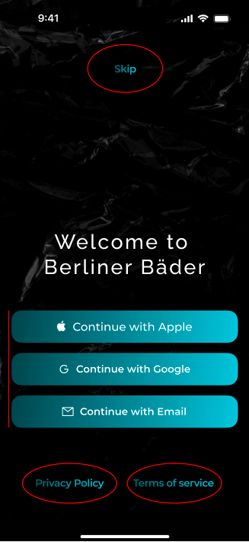
image 41
After
tempImageLR4wcM 1
9:41
Skip registration
Welcome to
Berliner Bäder
Continue with Google
Continue with Email
Already registered? Sign in
Comments
“What is the search bar on the top for?” “In my opinion so bright red doesn't really fit the color palette.” “Even though I know it is a button on the item card, I feel sth is missing.” “It is hard to read. More contrast would be better.”
Before

tempImageu90PDY 1
Search
3,40 €
3,40 €
Tariff Tariff
9:41
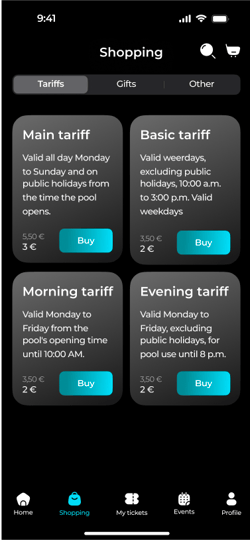
Basic tariff Valid weekdays, excluding public holidays, 10:00 a.m. to 3:00 p.m.
3, 50
2 €
Main tariff Valid all day Monday to Sunday and on public holidays from the time the pool opens.
5, 50
3, 50 €
Evening tariff Valid Monday to Friday, excluding public holidays, for pool use until 8 p.m.
3, 50 €
Morning tariff Valid Monday to Friday from the time the pool opens until 10:00 a.m.
3, 50
Home
Shopping
My tickets
Events
Profile
After
image 98
I chose to maintain the dark background to enhance readability and create a stronger visual contrast.I got rid of search bar at the top as there are not many items in the shop and it takes a lot of space on the top.
04 UI & Style Guide

After wireframing I created a look & feel for the app and added branding elements. I aimed to create a sense of modernity and reliability, while also evoking feelings of relaxation and wellness through the style guide
Rectangle 1083
Typography
I used elegant and modern sans-serif font that is easy to read, it has a clean and minimalistic look.
Montserrat Semi Bold / Medium / Regular
Name Font Size
Heading1 Semi Bold 48 px
Heading2 Semi Bold 32 px
Subh1 Semi Bold 24 px
Subh2 Semi Bold 20 px
Label1 Semi Bold 16 px
Body1 Semi Bold 14 px
Body2 Medium 14 px
Label2 Regular 14 px
Label3 Regular 12 px
Label4 Medium 10 px
Colors
Primary Solid
HEX
#00CCE5
100%
Primary Linear
HEX
#124349 #00D9F3
100%
Background Secondary
HEX
#1A1A1A
100%
Background Primary
HEX
#000000
100%
Text Primary
HEX #FFFFFF 100%
Text Secondary
HEX #808080 100%
System One
HEX
#636366
100%
System Two
HEX
#787880
24%
Disabled
HEX #182A2C 100%
Iconography
Main UI Elements
Buttons
Primary Button
Disabled Button
Secondary Button
Text Button
Text fields
Input
Input
Input
tempImagelz6yjJ 1
XXX XXX XX XX
Card item
Basic tariff Valid weerdays, excluding public holidays, 10:00 a.m. to 3:00 p.m. Valid weekdays
3,50 € 2 €
Buy
Basic
tariff
2 €
Tabs
Home
Shopping
My tickets
Events
Profile
Navigation bar
Title
05 FInal Visual Design
Welcome screens
shadow
main
iPhone 15 Pro Portrait Mockup label
shadow
main
iPhone 15 Pro Portrait Mockup label
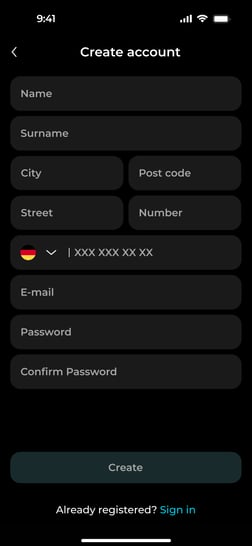
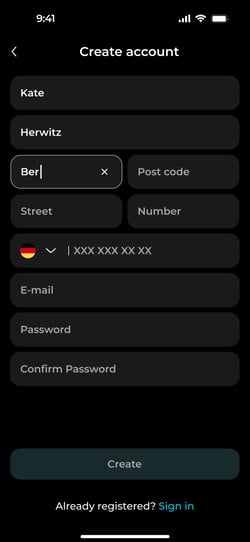
Create account screens
shadow
main
iPhone 15 Pro Portrait Mockup label
shadow
main
iPhone 15 Pro Portrait Mockup label
shadow
main
iPhone 15 Pro Portrait Mockup label
Home page + Shopping
shadow
main
iPhone 15 Pro Portrait Mockup label
shadow
main
iPhone 15 Pro Portrait Mockup label
Registration for the event
shadow
main
iPhone 15 Pro Portrait Mockup label
shadow
main
iPhone 15 Pro Portrait Mockup label
shadow
main
iPhone 15 Pro Portrait Mockup label
shadow
main
iPhone 15 Pro Portrait Mockup label
shadow
main
iPhone 15 Pro Portrait Mockup label
iPhone 16 Pro
Thanks for watching.
Native App | Redesign
Industry E-commerce
Role UI/UX Designer
Tools Figma
Skills
Wireframing
Prototyping
User Testing
Visual Design
Context Berliner Bäder is an online shop that provides access to tickets and memberships for swimming pools across Berlin. The current website requires a complete redesign to deliver a modern e-commerce experience. It lacks visual hierarchy, high-quality imagery, and an intuitive user experience for accessing essential features.
Users ● General Users (18+): Individuals seeking a quick and easy way to purchase swimming pool tickets, avoiding
long queues.
● Teachers: Educators registering school classes for participation in swimming competitions.
● Companies (Participants): Employers interested in participating in sports events.
● Companies (Recruiters): Employers exploring potential future trainees at sports events.
Key Features ● Purchase Tariffs/Vouchers
● Event Monitoring
● Event Registration
Current Web Design
Poor navigation
Outdated design
low-quality and uninviting images
Content Structure
Form Labels
Visual Accessibility
Registration process for sports events is unclear and complex
Low readability
Берлинер-бедер 1
01 User Flow To make it easy and intuitive for users to reach their goals in the app, I captured the necessary steps and showed them in User Flows at the beginning.  The following tasks can be completed by the user when using the app:

Flow 1. Create a profile
Flow 2. Buy a tariff/ voucher for friends or family
Flow 3. Register for pool events/competitions for school classes or employers
Splash screen
Log In or Sign Up
Home
Do you have an account?
Yes
No
Sign Up
Sign In
Fill personal info
Register
Success!
Events
Register as viewer
Register as participant
Сatalog
Choose an item
Add to cart
Cart
Check out
Check out
Choose payment variant
Input payment info
Confirm
03 Mid-fid wireframes
After mapping out the flow, I progressed to creating mid- to high-fidelity wireframes using a mobile-first approach, focusing on simplicity and intuitive navigation. The goal was to design clear, user-friendly screens by reducing complexity and ensuring easy access to key features
Home
Shopping
My tickets
Events
Profile
Lorem ipsum dolor sit amet consectetur.
Lorem Impsum
9:41
9:41
Home
Shopping
My tickets
Events
Profile
Tariff name Lorem ipsum dolor sit amet, consectetur adipiscing elit ut labore et dolore
3,50 € 2 €
Buy
Shopping
Tariffs
Gifts
Other
Lorem Impsum Lorem ipsum dolor sit amet, consectetur adipiscing elit ut labore et dolore
3,50 € 2 €
Buy
Lorem Impsum Lorem ipsum dolor sit amet, consectetur adipiscing elit ut labore et dolore
3,50 € 2 €
Buy
Lorem Impsum Lorem ipsum dolor sit amet, consectetur adipiscing elit ut labore et dolore
3,50 € 2 €
Buy
Lorem Impsum Lorem ipsum dolor sit amet, consectetur adipiscing elit ut labore et dolore
3,50 € 2 €
Buy
9:41
Your cart (2)
Lorem ipsum
- 1 +
3,50 2 €
Lorem
ipsum
- 1 +
3,50 2 €
Add more items
Total 6,80 €
Continue with Apple Pay
Other method
08:00 am
14:00 pm
10:00 am
16:00 pm
12:00 am
18:00 pm
Select a time
Next
Participant
Viewer
Back
Registration
9:41
15
Select the amount of participants
Next
Participant
Viewer
Back
Registration
9:41
04 User Testing
After developing the high-fidelity prototype, I conducted usability testing with five users. The feedback primarily focused on the UI design. Below is a summary of their input and the changes I implemented based on their suggestions. Here is some of them:
Before
image 41
After
“I did not understand what the "skip" will accomplish. somehow because of empty space around it grabs my attention.” “I am a little bit confused about how to move on. If I have an account, where should I click? These options are not clear. Three buttons with same color confuses me.”
Before
tempImageu90PDY 1
Search
3,40 €
3,40 €
Tariff Tariff
9:41
Basic tariff Valid weekdays, excluding public holidays, 10:00 a.m. to 3:00 p.m.
3, 50
2 €
Main tariff Valid all day Monday to Sunday and on public holidays from the time the pool opens.
5, 50
3, 50 €
Evening tariff Valid Monday to Friday, excluding public holidays, for pool use until 8 p.m.
3, 50 €
Morning tariff Valid Monday to Friday from the time the pool opens until 10:00 a.m.
3, 50
Home
Shopping
My tickets
Events
Profile
After
“What is the search bar on the top for?” “In my opinion so bright red doesn't really fit the color palette.” “Even though I know it is a button on the item card, I feel sth is missing.” “It is hard to read. More contrast would be better.”
I chose to maintain the dark background to enhance readability and create a stronger visual contrast.I got rid of search bar at the top as there are not many items in the shop and it takes a lot of space on the top.
04 UI & Style Guide
After wireframing I created a look & feel for the app and added branding elements. I aimed to create a sense of modernity and reliability, while also evoking feelings of relaxation and wellness through the style guide
Rectangle 1083
Typography
I used elegant and modern sans-serif font that is easy to read, it has a clean and minimalistic look.
Montserrat Semi Bold / Medium / Regular
Aa
Name Font Size
Heading1 Semi Bold 48 px
Heading2 Semi Bold 32 px
Subheading1 Semi Bold 24 px
Subheading2 Semi Bold 20 px
Label1 Semi Bold 16 px
Body1 Semi Bold 14 px
Body2 Medium 14 px
Label2 Regular 14 px
Label3 Regular 12 px
Label4 Medium 10 px
Colors
Primary Solid
HEX
#00CCE5
100%
Primary Linear
HEX
#124349 #00D9F3
100%
Background Secondary
HEX
#1A1A1A
100%
Background Primary
HEX
#000000
100%
Text Primary
HEX #FFFFFF 100%
Text Secondary
HEX #808080 100%
System One
HEX
#636366
100%
System Two
HEX
#787880
24%
Disabled
HEX #182A2C 100%
Iconography
Main UI Elements
Buttons
Primary Button
Disabled Button
Secondary Button
Text Button
Text fields
Input
Input
Input
tempImagelz6yjJ 1
XXX XXX XX XX
Card item
Basic tariff Valid weerdays, excluding public holidays, 10:00 a.m. to 3:00 p.m. Valid weekdays
3,50 € 2 €
Buy
Basic
tariff
2 €
Tabs
Home
Shopping
My tickets
Events
Profile
Navigation bar
Title
05 FInal Visual Design
Welcome screens
shadow
main
iPhone 15 Pro Portrait Mockup label
shadow
main
iPhone 15 Pro Portrait Mockup label
Create account screens
shadow
main
iPhone 15 Pro Portrait Mockup label
shadow
main
iPhone 15 Pro Portrait Mockup label
shadow
main
iPhone 15 Pro Portrait Mockup label
Home page + Shopping
shadow
main
iPhone 15 Pro Portrait Mockup label
shadow
main
iPhone 15 Pro Portrait Mockup label
Registration for the event
shadow
main
iPhone 15 Pro Portrait Mockup label
shadow
main
iPhone 15 Pro Portrait Mockup label
shadow
main
iPhone 15 Pro Portrait Mockup label
shadow
main
iPhone 15 Pro Portrait Mockup label
shadow
main
iPhone 15 Pro Portrait Mockup label
iPhone 16 Pro
Thanks for watching.
Native App | Redesign
Industry E-commerce
Role UI/UX Designer
Tools Figma
Skills
Wireframing
Prototyping
User Testing
Visual Design
Context Berliner Bäder is an online shop that provides access to tickets and memberships for swimming pools across Berlin. The current website requires a complete redesign to deliver a modern e-commerce experience. It lacks visual hierarchy, high-quality imagery, and an intuitive user experience for accessing essential features.
Users ● General Users (18+): Individuals seeking a quick and easy way to purchase swimming pool tickets, avoiding
long queues.
● Teachers: Educators registering school classes for participation in swimming competitions.
● Companies (Participants): Employers interested in participating in sports events.
● Companies (Recruiters): Employers exploring potential future trainees at sports events.
Key Features ● Purchase Tariffs/Vouchers
● Event Monitoring
● Event Registration
Current Web Design
Poor navigation
Outdated design
low-quality and uninviting images
Content Structure
Form Labels
Visual Accessibility
Registration process for sports events is unclear and complex
Low readability
Берлинер-бедер 1
01 User Flow To make it easy and intuitive for users to reach their goals in the app, I captured the necessary steps and showed them in User Flows at the beginning.  The following tasks can be completed by the user when using the app:

Flow 1. Create a profile
Flow 2. Buy a tariff/ voucher for friends or family
Flow 3. Register for pool events/competitions for school classes or employers
Splash screen
Log In or Sign Up
Home
Do you have an account?
Yes
No
Sign Up
Sign In
Events
Register as viewer
Register as participant
Сatalog
Choose an item
Add to cart
Cart
Check out
Check out
Choose payment variant
Input payment info
Confirm
Fill personal info
Register
Success!
03 Mid-fid wireframes
After mapping out the flow, I progressed to creating mid- to high-fidelity wireframes using a mobile-first approach, focusing on simplicity and intuitive navigation. The goal was to design clear, user-friendly screens by reducing complexity and ensuring easy access to key features
Home
Shopping
My tickets
Events
Profile
Lorem ipsum dolor sit amet consectetur.
Lorem Impsum
9:41
9:41
Home
Shopping
My tickets
Events
Profile
Tariff name Lorem ipsum dolor sit amet, consectetur adipiscing elit ut labore et dolore
3,50 € 2 €
Buy
Shopping
Tariffs
Gifts
Other
Lorem Impsum Lorem ipsum dolor sit amet, consectetur adipiscing elit ut labore et dolore
3,50 € 2 €
Buy
Lorem Impsum Lorem ipsum dolor sit amet, consectetur adipiscing elit ut labore et dolore
3,50 € 2 €
Buy
Lorem Impsum Lorem ipsum dolor sit amet, consectetur adipiscing elit ut labore et dolore
3,50 € 2 €
Buy
Lorem Impsum Lorem ipsum dolor sit amet, consectetur adipiscing elit ut labore et dolore
3,50 € 2 €
Buy
9:41
Your cart (2)
Lorem ipsum
- 1 +
3,50 2 €
Lorem
ipsum
- 1 +
3,50 2 €
Add more items
Total 6,80 €
Continue with Apple Pay
Other method
08:00 am
14:00 pm
10:00 am
16:00 pm
12:00 am
18:00 pm
Select a time
Next
Participant
Viewer
Back
Registration
9:41
15
Select the amount of participants
Next
Participant
Viewer
Back
Registration
9:41
04 User Testing
After developing the high-fidelity prototype, I conducted usability testing with five users. The feedback primarily focused on the UI design. Below is a summary of their input and the changes I implemented based on their suggestions. Here is some of them:
Before
image 41
After
“I did not understand what the "skip" will accomplish. somehow because of empty space around it grabs my attention.” “I am a little bit confused about how to move on. If I have an account, where should I click? These options are not clear. Three buttons with same color confuses me.”
Before
tempImageu90PDY 1
Search
3,40 €
3,40 €
Tariff Tariff
9:41
Basic tariff Valid weekdays, excluding public holidays, 10:00 a.m. to 3:00 p.m.
3, 50
2 €
Main tariff Valid all day Monday to Sunday and on public holidays from the time the pool opens.
5, 50
3, 50 €
Evening tariff Valid Monday to Friday, excluding public holidays, for pool use until 8 p.m.
3, 50 €
Morning tariff Valid Monday to Friday from the time the pool opens until 10:00 a.m.
3, 50
Home
Shopping
My tickets
Events
Profile
After
“What is the search bar on the top for?” “In my opinion so bright red doesn't really fit the color palette.” “Even though I know it is a button on the item card, I feel sth is missing.” “It is hard to read. More contrast would be better.”
I chose to maintain the dark background to enhance readability and create a stronger visual contrast.I got rid of search bar at the top as there are not many items in the shop and it takes a lot of space on the top.
04 UI & Style Guide
After wireframing I created a look & feel for the app and added branding elements. I aimed to create a sense of modernity and reliability, while also evoking feelings of relaxation and wellness through the style guide
Rectangle 1083
Typography
I used elegant and modern sans-serif font that is easy to read, it has a clean and minimalistic look.
Montserrat Semi Bold / Medium / Regular
Aa
Name Font Size
Heading1 Semi Bold 48 px
Heading2 Semi Bold 32 px
Subheading1 Semi Bold 24 px
Subheading2 Semi Bold 20 px
Label1 Semi Bold 16 px
Body1 Semi Bold 14 px
Body2 Medium 14 px
Label2 Regular 14 px
Label3 Regular 12 px
Label4 Medium 10 px
Colors
Primary Solid
HEX
#00CCE5
100%
Primary Linear
HEX
#124349 #00D9F3
100%
Background Secondary
HEX
#1A1A1A
100%
Background Primary
HEX
#000000
100%
Text Primary
HEX #FFFFFF 100%
Text Secondary
HEX #808080 100%
System One
HEX
#636366
100%
System Two
HEX
#787880
24%
Disabled
HEX #182A2C 100%
Iconography
Main UI Elements
Buttons
Primary Button
Disabled Button
Secondary Button
Text Button
Text fields
Input
Input
Input
tempImagelz6yjJ 1
XXX XXX XX XX
Card item
Basic tariff Valid weerdays, excluding public holidays, 10:00 a.m. to 3:00 p.m. Valid weekdays
3,50 € 2 €
Buy
Basic
tariff
2 €
Tabs
Home
Shopping
My tickets
Events
Profile
Navigation bar
Title
05 FInal Visual Design
Welcome screens
shadow
main
iPhone 15 Pro Portrait Mockup label
shadow
main
iPhone 15 Pro Portrait Mockup label
Create account screens
shadow
main
iPhone 15 Pro Portrait Mockup label
shadow
main
iPhone 15 Pro Portrait Mockup label
shadow
main
iPhone 15 Pro Portrait Mockup label
Home page + Shopping
shadow
main
iPhone 15 Pro Portrait Mockup label
shadow
main
iPhone 15 Pro Portrait Mockup label
Registration for the event
shadow
main
iPhone 15 Pro Portrait Mockup label
shadow
main
iPhone 15 Pro Portrait Mockup label
shadow
main
iPhone 15 Pro Portrait Mockup label
shadow
main
iPhone 15 Pro Portrait Mockup label
shadow
main
iPhone 15 Pro Portrait Mockup label
iPhone 16 Pro
Thanks for watching.